# WhatsApp To and From Number Selection

> Learn how GHL Customer Care automatically selects the correct WhatsApp From number in Conversations, keeps replies aligned with the 24-hour session.

- Source: https://docs.ghlcustomercare.com/docs/reselling-products/whatsapp/whatsapp-to-and-from-number-selection
- Section: Reselling Products / WhatsApp
- Reading time: 2 min
- Images: 1, each explained below

---
# WhatsApp To and From Number Selection

If your team manages multiple WhatsApp numbers, it's easy to message from the wrong business identity. CRM now helps reduce errors by automatically selecting the correct WhatsApp From number in Conversations and applying compliance guardrails when needed.

TABLE OF CONTENTS

<table style="width: 100%"><tbody><tr><td><a href="#what-is-to-and-from-number" style="text-decoration: none">What is To and From Number?</a></td></tr><tr><td><a href="#key-benefits-of-to-and-from-number-selection" style="text-decoration: none">Key Benefits of To and From Number Selection</a></td></tr><tr><td><a href="#how-to-use-to-and-from-number" style="text-decoration: none">How to Use To and From Number</a></td></tr><tr><td><a href="#frequently-asked-questions" style="text-decoration: none">Frequently Asked Questions</a></td></tr><tr><td><a href="#relevant-articles" style="text-decoration: none">Relevant Articles</a></td></tr></tbody></table>

## What is To and From Number?

WhatsApp To and From number selection handling improves how Conversations chooses the numbers used for WhatsApp messaging:

<table style="width: 100%"><tbody><tr><td style="width: 50%; vertical-align: top"><div><p><strong>From number:</strong> The business WhatsApp number used to send messages.</p></div></td><td style="width: 50%; vertical-align: top"><div><p><strong>To number:</strong> The contact phone number you are messaging.</p></div></td></tr></tbody></table>

CRM automatically:

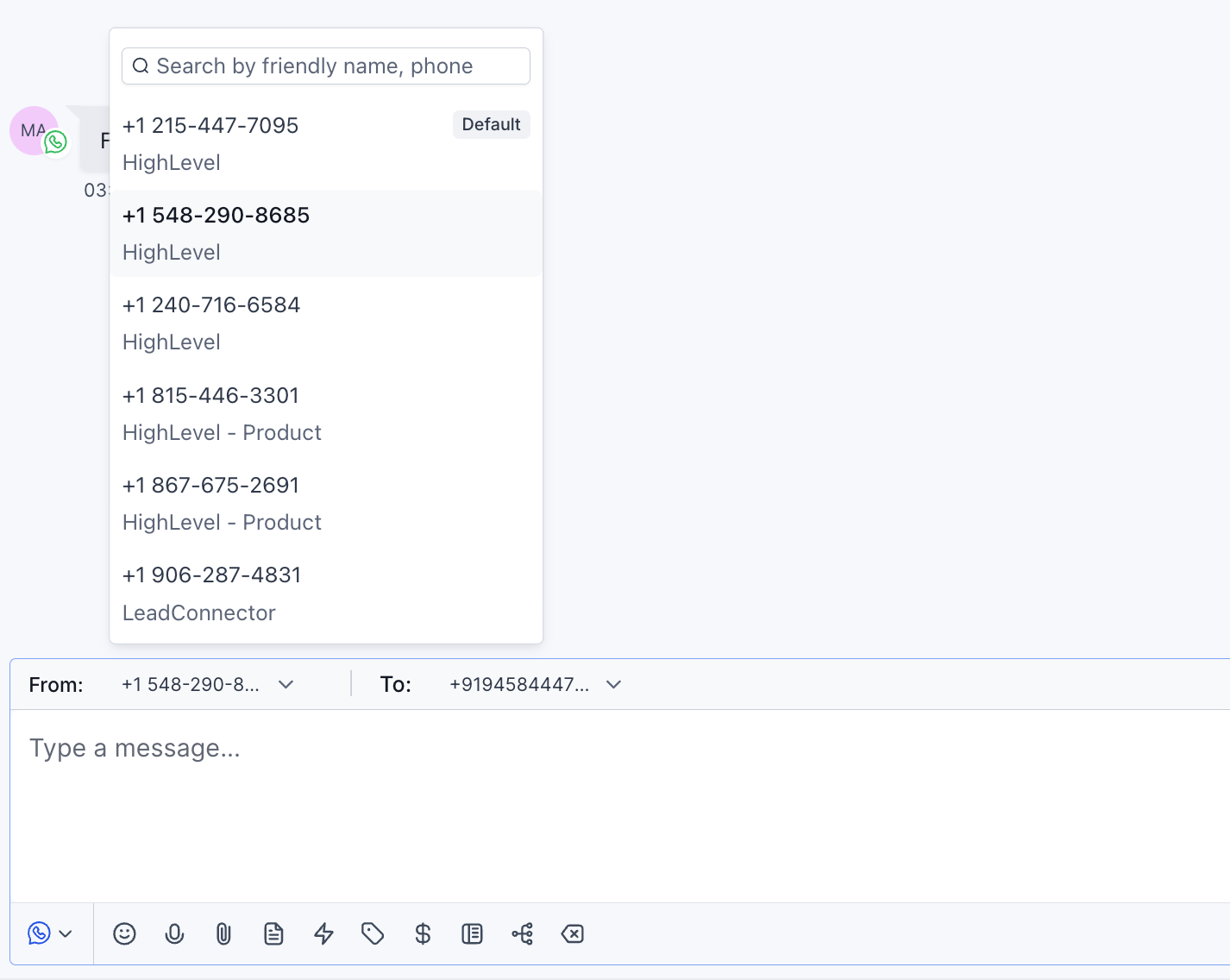
1.  Pre-selects the correct default WhatsApp From number when you start a new conversation.
2.  Detects and locks the correct From number for active conversations based on the current WhatsApp 24-hour session.
3.  Maintains independent WhatsApp conversation states for contacts with multiple phone numbers.
4.  Transitions to approved template messaging when a user intentionally switches the From number and compliance requires it.

## Key Benefits of To and From Number Selection

-   **Reduces Mistakes:** Helps prevent messaging from the wrong WhatsApp business number.
-   **Improves Agent Efficiency:** Removes guesswork and manual switching in the composer.
-   **Increases Consistency:** Keeps conversations aligned to the correct business identity and contact number.
-   **Built-in Compliance:** Uses template messaging when required, using existing compliance logic.
-   **Cleaner Multi-Number Workflows:** Avoids confusion when contacts have multiple phone numbers and multiple active threads.

## How to Use To and From Number

**Start a new WhatsApp conversation**

<table style="width: 100%"><tbody><tr><td style="width: 40px; vertical-align: top"><div style="text-align: center; font-weight: 700">1</div></td><td style="vertical-align: top"><p>Go to Conversations.</p></td></tr></tbody></table>

<table style="width: 100%"><tbody><tr><td style="width: 40px; vertical-align: top"><div style="text-align: center; font-weight: 700">2</div></td><td style="vertical-align: top"><p>Start a new message to a contact.</p></td></tr></tbody></table>

<table style="width: 100%"><tbody><tr><td style="width: 40px; vertical-align: top"><div style="text-align: center; font-weight: 700">3</div></td><td style="vertical-align: top"><p>Verify the WhatsApp From number shown in the composer.</p><p>
![WhatsApp From number shown in the composer](https://s3.amazonaws.com/cdn.freshdesk.com/data/helpdesk/attachments/production/155068237396/original/yPuNFeA2Ue9mcdC9xX8TKnFvSgID9iNg1g.png)

**How to Use To and From Number (image 1 of 1)**

This screenshot appears in the "How to Use To and From Number" section of "WhatsApp To and From Number Selection". For context, this section explains: WhatsApp To and From Number Selection If your team manages multiple WhatsApp numbers, it's easy to message from the wrong business identity. CRM now helps reduce errors by automatically selecting the correct WhatsApp From number in Conversations and applying compliance guardrails when needed….
- Controls: Start a new WhatsApp conversation

Full procedure:

1. Pre-selects the correct default WhatsApp From number when you start a new conversation.
2. Detects and locks the correct From number for active conversations based on the current WhatsApp 24-hour session.
3. Maintains independent WhatsApp conversation states for contacts with multiple phone numbers.
4. Transitions to approved template messaging when a user intentionally switches the From number and compliance requires it.
</p></td></tr></tbody></table>

<table style="width: 100%"><tbody><tr><td style="width: 40px; vertical-align: top"><div style="text-align: center; font-weight: 700">4</div></td><td style="vertical-align: top"><p>Send your message.</p></td></tr></tbody></table>

The correct default WhatsApp number will be automatically pre-selected.

CRM automatically detects and uses the correct WhatsApp From number tied to the active 24-hour session, reducing the risk of replying from the wrong number.

When you change the From number, CRM transitions to template messaging when required to stay compliant.

CRM also maintains independent conversation states per contact phone number and updates the WhatsApp routing automatically when you switch the contact's phone number.

## Frequently Asked Questions

Q: Why is the WhatsApp From number pre-selected?

To remove ambiguity and reduce accidental sends from the wrong WhatsApp business identity — especially for locations with multiple WhatsApp numbers.

Q: Why can't I change the WhatsApp From number in some conversations?

In active conversations, CRM locks the From number to the correct WhatsApp number based on the current 24-hour session to prevent compliance and routing issues.

Q: What happens if I switch the WhatsApp From number?

If compliance requires it, CRM transitions the message to approved template messaging using existing compliance logic.

Q: If a contact has multiple phone numbers, will it affect WhatsApp conversations?

Yes. CRM maintains independent WhatsApp conversation states for each contact phone number. When you switch the contact's phone number, the WhatsApp routing updates automatically.

## Relevant Articles

[Select SMS To and From Numbers](https://docs.ghlcustomercare.com/docs/conversations/conversations/select-sms-to-and-from-numbers)

[WhatsApp: Send Message Templates (Snippets)](https://docs.ghlcustomercare.com/docs/reselling-products/whatsapp/whatsapp-send-message-templates-snippets)

WhatsApp: Customer Service Window

Getting Started with the Conversations Tab Experience

[WhatsApp – Workflow Integration](https://docs.ghlcustomercare.com/docs/reselling-products/whatsapp/whatsapp-workflow-integration)

---

Documentation for GHL Customer Care. Support: support@ghlcustomercare.com