# WhatsApp Audit Logs

> Track who changed what and when for WhatsApp in GHL Customer Care. Use sub-account Audit Logs to speed troubleshooting, boost accountability, and reduce risk.

- Source: https://docs.ghlcustomercare.com/docs/reselling-products/whatsapp/whatsapp-audit-logs
- Section: Reselling Products / WhatsApp
- Reading time: 3 min
- Images: 2, each explained below

---
# WhatsApp Audit Logs

WhatsApp Audit Logs give you full visibility into changes made to your WhatsApp Business setup in a sub-account. You can quickly see who made a change, what they changed, when it happened, and which WhatsApp asset it affected.

TABLE OF CONTENTS

<table style="width: 100%"><tbody><tr><td><a href="#what-are-whatsapp-audit-logs" style="text-decoration: none">What Are WhatsApp Audit Logs?</a></td></tr><tr><td><a href="#key-benefits-of-whatsapp-audit-logs" style="text-decoration: none">Key Benefits of WhatsApp Audit Logs</a></td></tr><tr><td><a href="#actions-tracked-for-whatsapp" style="text-decoration: none">Actions Tracked for WhatsApp</a></td></tr><tr><td><a href="#how-to-access-whatsapp-audit-logs" style="text-decoration: none">How to Access WhatsApp Audit Logs</a></td></tr><tr><td><a href="#using-whatsapp-audit-logs-for-troubleshooting" style="text-decoration: none">Using WhatsApp Audit Logs for Troubleshooting</a></td></tr><tr><td><a href="#scope-and-retention" style="text-decoration: none">Scope and Retention</a></td></tr><tr><td><a href="#frequently-asked-questions" style="text-decoration: none">Frequently Asked Questions</a></td></tr><tr><td><a href="#related-articles" style="text-decoration: none">Related Articles</a></td></tr></tbody></table>

## What Are WhatsApp Audit Logs?

WhatsApp Audit Logs are part of CRM's shared Audit Logs system. Each entry records:

-   The user who performed the action
-   The action taken
-   The timestamp
-   The affected WhatsApp entity (such as a phone number, template, or flow)

These logs help you troubleshoot issues faster, maintain accountability across your team, and keep a reliable history of important WhatsApp changes.

## Key Benefits of WhatsApp Audit Logs

-   **Instant visibility:** Quickly see who changed a WhatsApp number, template, or flow, and when it happened.
-   **Greater accountability:** Hold team members responsible for changes to WhatsApp assets across the sub-account.
-   **Faster troubleshooting:** Use the audit trail to identify when a change caused an issue and who can help fix it.
-   **Reduced miscommunication:** Eliminate guesswork and back-and-forth when something breaks or behaves differently.
-   **Stronger operational control:** Keep a clear record of important WhatsApp configuration changes over time.

## Actions Tracked for WhatsApp

The following WhatsApp-related actions are logged at the sub-account level:

| WhatsApp Entity | Logged Actions |
| --- | --- |
| Phone Number | Added |
| WhatsApp Business Account (WABA) | Deleted, Deactivated |
| Default Phone Number | Updated |
| Template | Created, Updated, Deleted |
| Phone Number Profile | Updated |
| Flow | Created, Published, Deprecated, Deleted |

Each event creates a time-stamped log entry so you can reconstruct what happened when changes impact your WhatsApp conversations or workflows.

## How to Access WhatsApp Audit Logs

WhatsApp Audit Logs are available inside each sub-account.

<table style="width: 100%"><tbody><tr><td style="width: 40px; vertical-align: top"><div style="text-align: center; font-weight: 700">1</div></td><td style="vertical-align: top"><p>Open the sub-account you want to review, and go to Settings → Audit Logs.</p></td></tr></tbody></table>

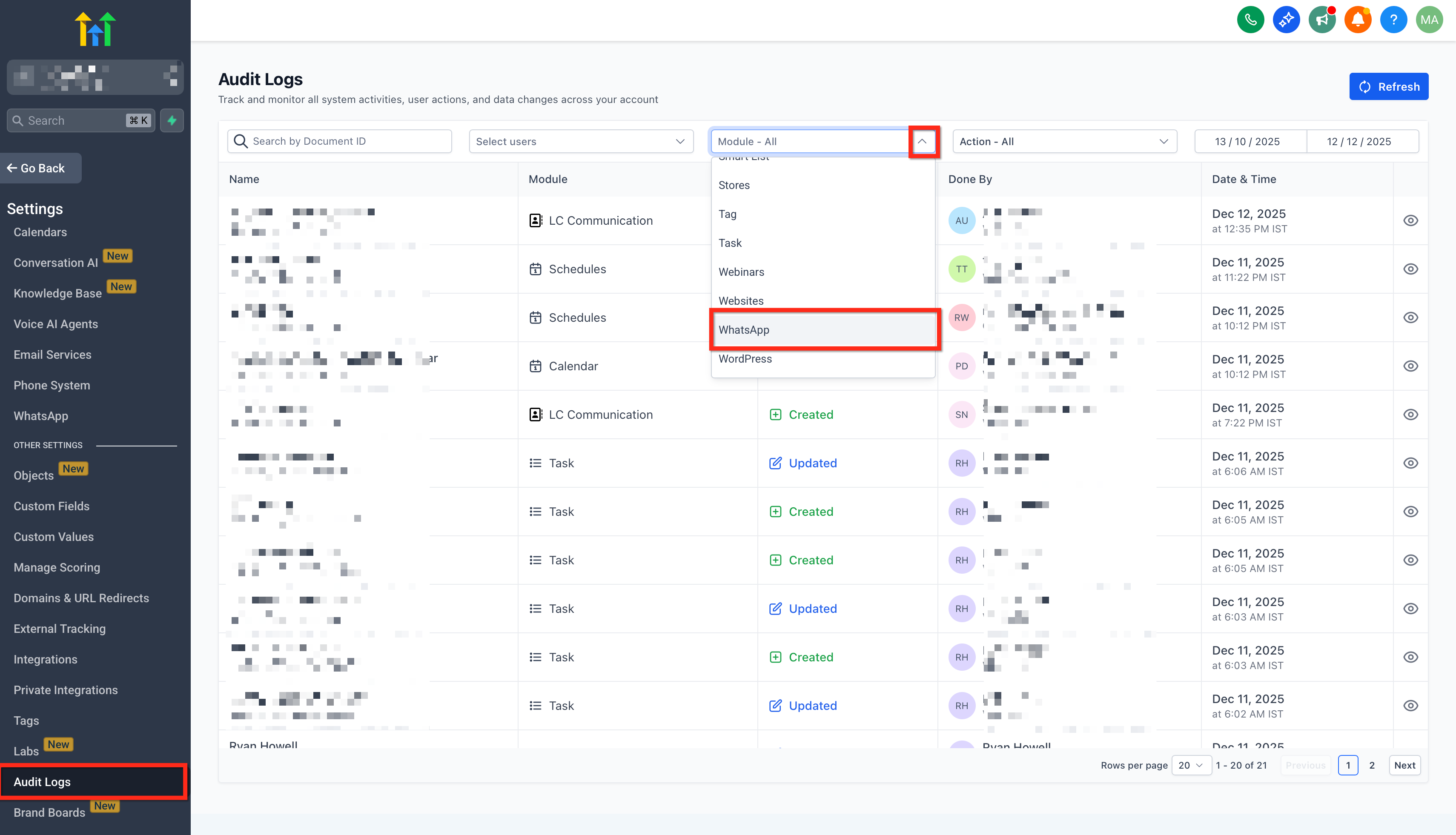
<table style="width: 100%"><tbody><tr><td style="width: 40px; vertical-align: top"><div style="text-align: center; font-weight: 700">2</div></td><td style="vertical-align: top"><p>Use the search and Module filter to focus on the WhatsApp-related activity you want to investigate.</p><p>
![Using search and Module filter to find WhatsApp activity](https://s3.amazonaws.com/cdn.freshdesk.com/data/helpdesk/attachments/production/155060517218/original/u5qJnHiJpEE1RhucAqHE1YzaHnxkHCS5vg.png)

**How to Access WhatsApp Audit Logs (image 1 of 2)**

This screenshot appears in the "How to Access WhatsApp Audit Logs" section of "WhatsApp Audit Logs". For context, this section explains: WhatsApp Audit Logs WhatsApp Audit Logs give you full visibility into changes made to your WhatsApp Business setup in a sub-account. You can quickly see who made a change, what they changed, when it happened, and which WhatsApp asset it affected. TABLE OF CONTENTS What Are WhatsApp Audit Logs? Key…. This part of the guide covers 3 fields, listed below.
- Fields: The user who performed the action, The action taken, The timestamp

Full procedure:

1. The user who performed the action
2. The action taken
3. The timestamp
4. The affected WhatsApp entity (such as a phone number, template, or flow)
</p></td></tr></tbody></table>

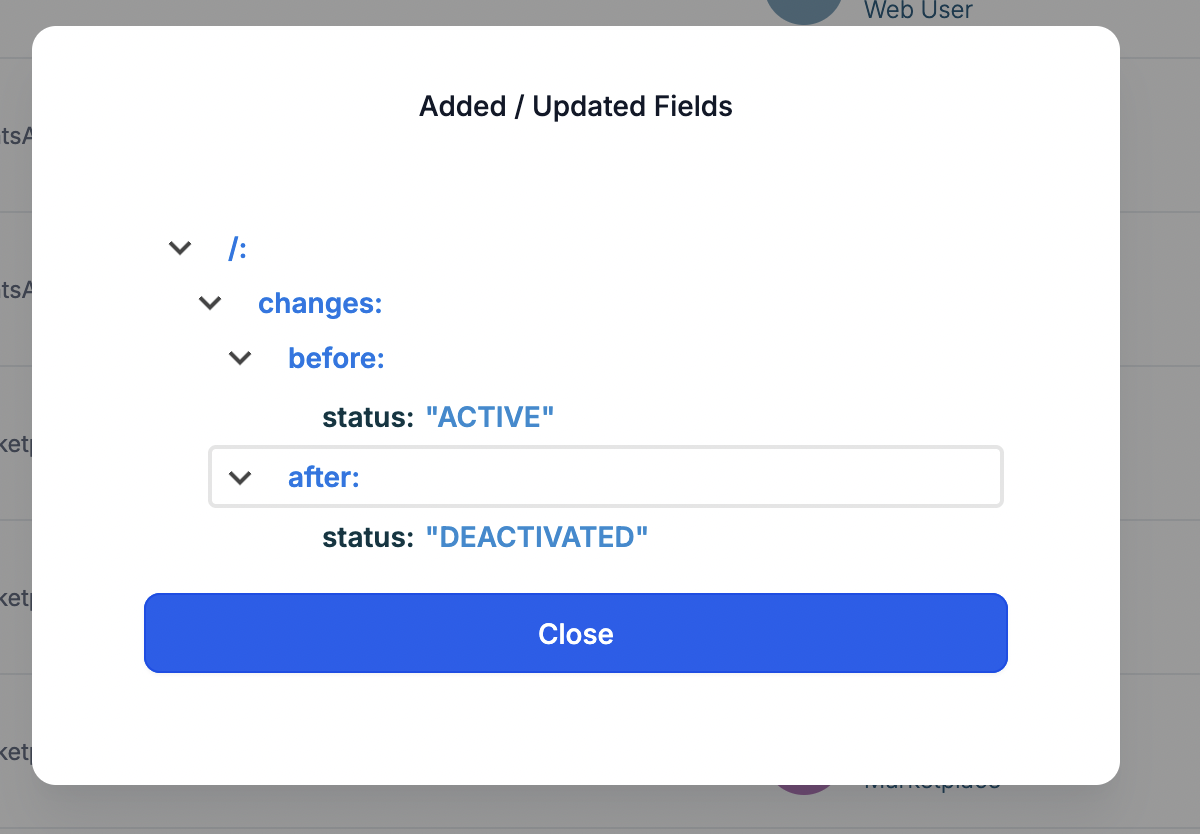
<table style="width: 100%"><tbody><tr><td style="width: 40px; vertical-align: top"><div style="text-align: center; font-weight: 700">3</div></td><td style="vertical-align: top"><p>Click any row to open the details drawer and review who changed what and when.</p><p>
![Details drawer showing who changed what and when](https://s3.amazonaws.com/cdn.freshdesk.com/data/helpdesk/attachments/production/155060517473/original/t28pTu2jKSTAkcev8gA1iRHsfgTz_GQh0w.png)

**How to Access WhatsApp Audit Logs (image 2 of 2)**

This screenshot appears in the "How to Access WhatsApp Audit Logs" section of "WhatsApp Audit Logs". For context, this section explains: WhatsApp Audit Logs WhatsApp Audit Logs give you full visibility into changes made to your WhatsApp Business setup in a sub-account. You can quickly see who made a change, what they changed, when it happened, and which WhatsApp asset it affected. TABLE OF CONTENTS What Are WhatsApp Audit Logs? Key…. This part of the guide covers 3 fields, listed below.
- Fields: The user who performed the action, The action taken, The timestamp

Full procedure:

1. The user who performed the action
2. The action taken
3. The timestamp
4. The affected WhatsApp entity (such as a phone number, template, or flow)
</p></td></tr></tbody></table>

## Using WhatsApp Audit Logs for Troubleshooting

Here are some common investigation scenarios:

A WhatsApp phone number disappeared or changed.

Check for events where a phone number was added, a default phone number was updated, or a WABA was deleted or deactivated.

Templates stopped sending or were modified unexpectedly.

Look for Template – Created / Updated / Deleted events to see which user changed or removed a template.

Flows behave differently than before.

Filter for Flow – Created / Published / Deprecated / Deleted to find recent configuration changes.

By reviewing the user, action, time, and entity, you can reduce guesswork, resolve issues quickly, and assign follow-up tasks to the correct team member.

## Scope and Retention

-   WhatsApp Audit Logs are recorded at the sub-account level only.
-   Audit Log entries are retained for 60 days and then automatically removed, in line with other Audit Logs in CRM.

## Frequently Asked Questions

Q: Are Audit Logs available in every sub-account?

Yes, access is provided at the sub-account level. Open the sub-account where WhatsApp is configured to view its logs.

Q: I don't see WhatsApp events, what should I check?

Confirm you're in the correct sub-account, expand your date range, and remove restrictive filters (like a specific user or entity) to broaden results.

Q: How long are WhatsApp audit events kept?

Audit events are retained for a limited window (for example, 60 days). Plan your review cadence accordingly.

Q: Can I get alerts when certain events happen?

Built-in notifications are not currently available. Consider scheduled log reviews during key projects.

Q: Who can view Audit Logs?

Visibility depends on sub-account roles/permissions. Contact a sub-account admin if you can't access Settings → Audit Logs.

## Related Articles

Audit Logs: Introducing the New Design Experience (UI)

[Audit Logs in Funnels, Websites, Webinars & Stores](https://docs.ghlcustomercare.com/docs/sites/funnels-and-websites/audit-logs-in-funnels-websites-webinars-stores)

[Custom Object Audit Logs](https://docs.ghlcustomercare.com/docs/custom-objects/managing-custom-object-records/custom-object-audit-logs)

[WhatsApp Full Setup Guide for Agency](https://docs.ghlcustomercare.com/docs/reselling-products/whatsapp/whatsapp-full-setup-guide-for-agency)

How to Set Up WhatsApp for a Sub-Account in CRM

---

Documentation for GHL Customer Care. Support: support@ghlcustomercare.com