| Navigate to Agency Account > App Marketplace |  **How To Install A Custom Conversation Provider (image 1 of 10)** This screenshot appears in the "How To Install A Custom Conversation Provider" section of "Custom Conversation Providers in Mobile App". The text alongside this image reads: If you want to develop apps for the GHL Customer Care App Marketplace start here https://marketplace.https://ghlcustomercare.com/. Immediately after, the guide continues: You'll find custom conversation providers in the Conversations tab of the mobile app. You can start a new conversation on any channel, including custom providers, or you can switch to a different channel manually inside an existing…. - What this covers: If you want to develop apps for the GHL Customer Care App Marketplace start here https://marketplace.https://ghlcustomercare.com/ - Next: You'll find custom conversation providers in the Conversations tab of the mobile app. You can start a new conversation on any channel, including custom providers, or you can switch to a different channel manually inside an existing conversation. |
| Under App Marketplace > Categories scroll until you find Email and click it to filter | 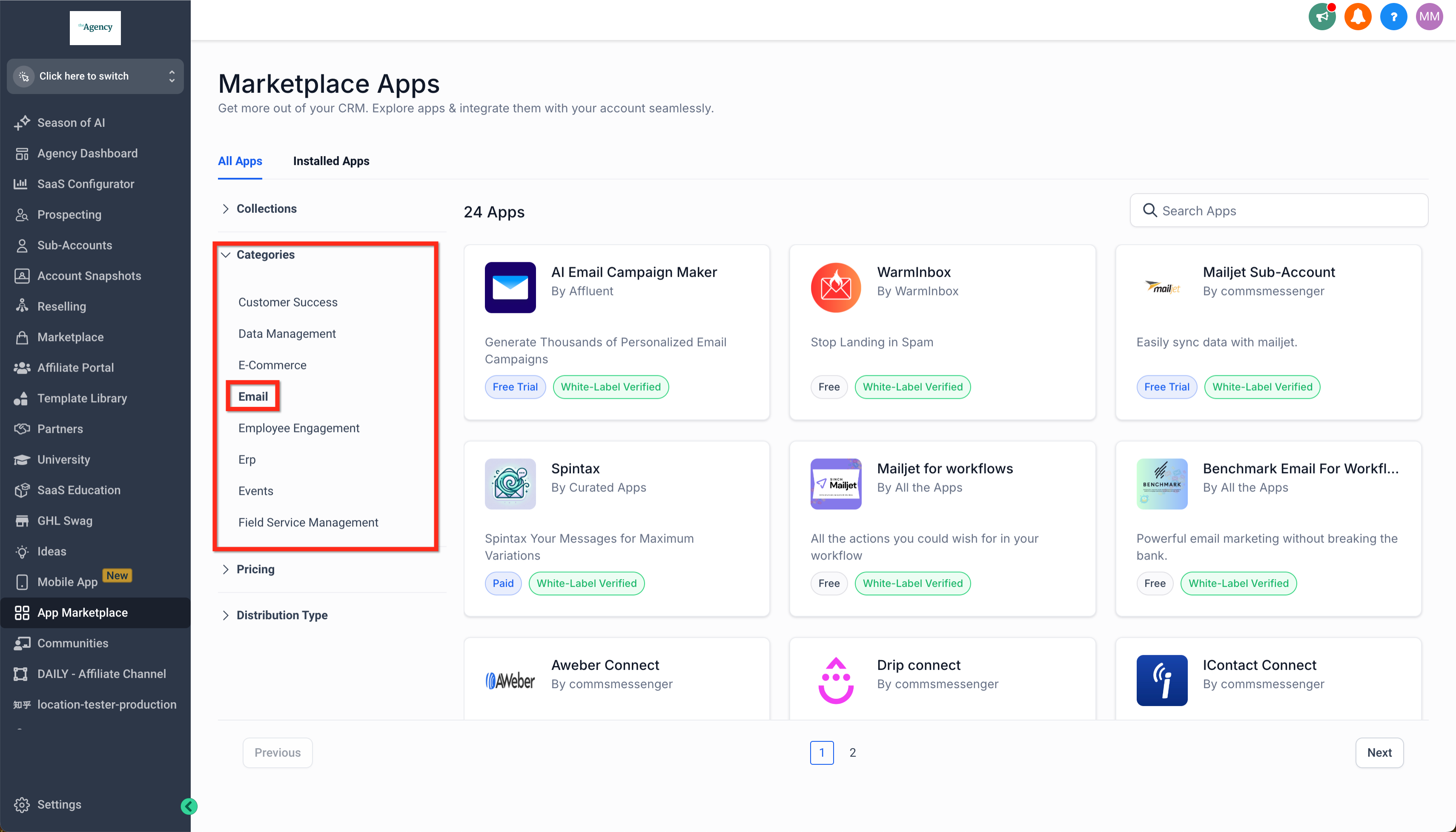 **How To Install A Custom Conversation Provider (image 2 of 10)** This screenshot appears in the "How To Install A Custom Conversation Provider" section of "Custom Conversation Providers in Mobile App". The text alongside this image reads: If you want to develop apps for the GHL Customer Care App Marketplace start here https://marketplace.https://ghlcustomercare.com/. Immediately after, the guide continues: You'll find custom conversation providers in the Conversations tab of the mobile app. You can start a new conversation on any channel, including custom providers, or you can switch to a different channel manually inside an existing…. - What this covers: If you want to develop apps for the GHL Customer Care App Marketplace start here https://marketplace.https://ghlcustomercare.com/ - Next: You'll find custom conversation providers in the Conversations tab of the mobile app. You can start a new conversation on any channel, including custom providers, or you can switch to a different channel manually inside an existing conversation. |
| Or scroll until you find SMS and click to filter | 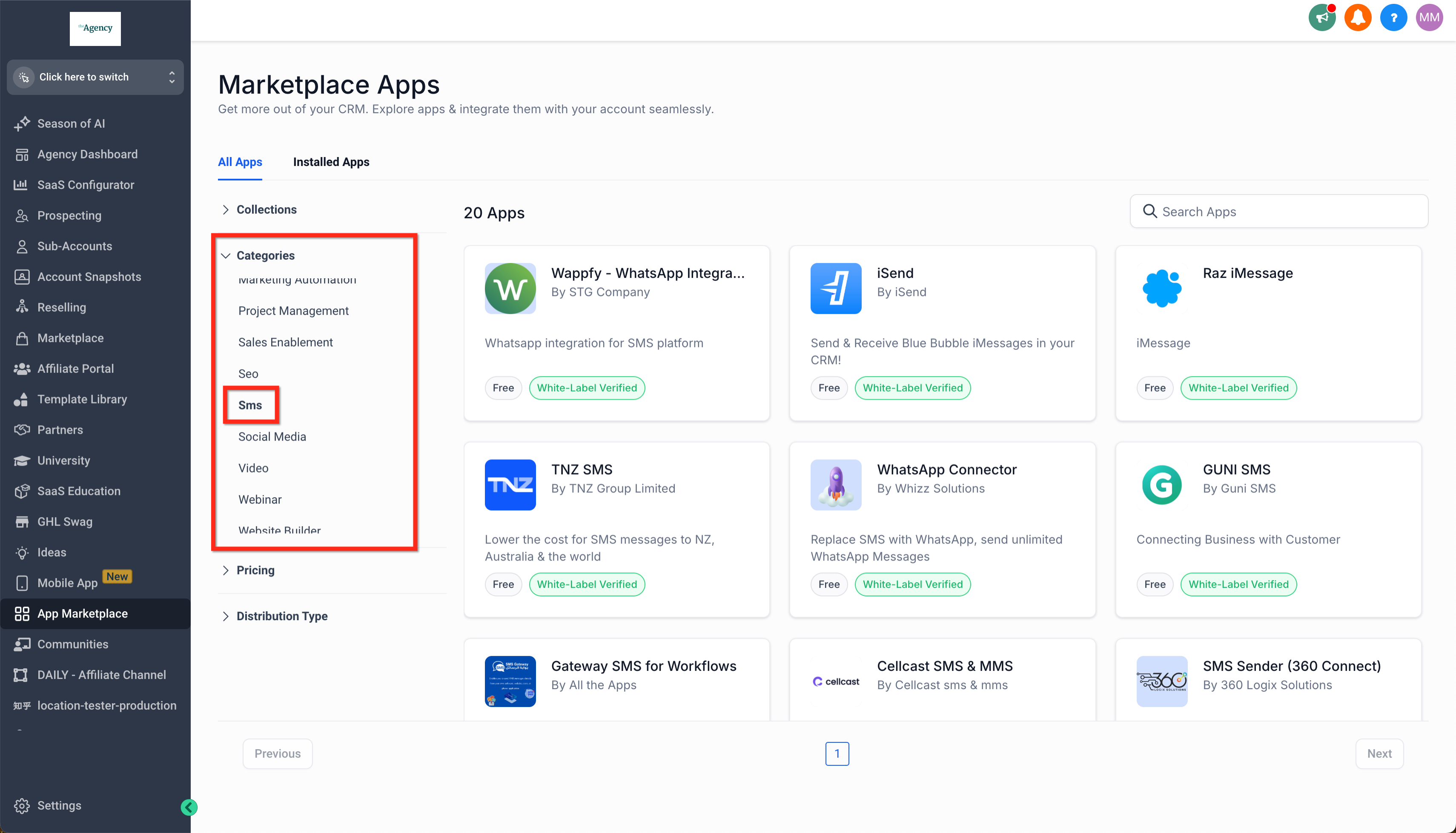 **How To Install A Custom Conversation Provider (image 3 of 10)** This screenshot appears in the "How To Install A Custom Conversation Provider" section of "Custom Conversation Providers in Mobile App". The text alongside this image reads: If you want to develop apps for the GHL Customer Care App Marketplace start here https://marketplace.https://ghlcustomercare.com/. Immediately after, the guide continues: You'll find custom conversation providers in the Conversations tab of the mobile app. You can start a new conversation on any channel, including custom providers, or you can switch to a different channel manually inside an existing…. - What this covers: If you want to develop apps for the GHL Customer Care App Marketplace start here https://marketplace.https://ghlcustomercare.com/ - Next: You'll find custom conversation providers in the Conversations tab of the mobile app. You can start a new conversation on any channel, including custom providers, or you can switch to a different channel manually inside an existing conversation. |
| Click on your preferred custom conversation provider and click Install | 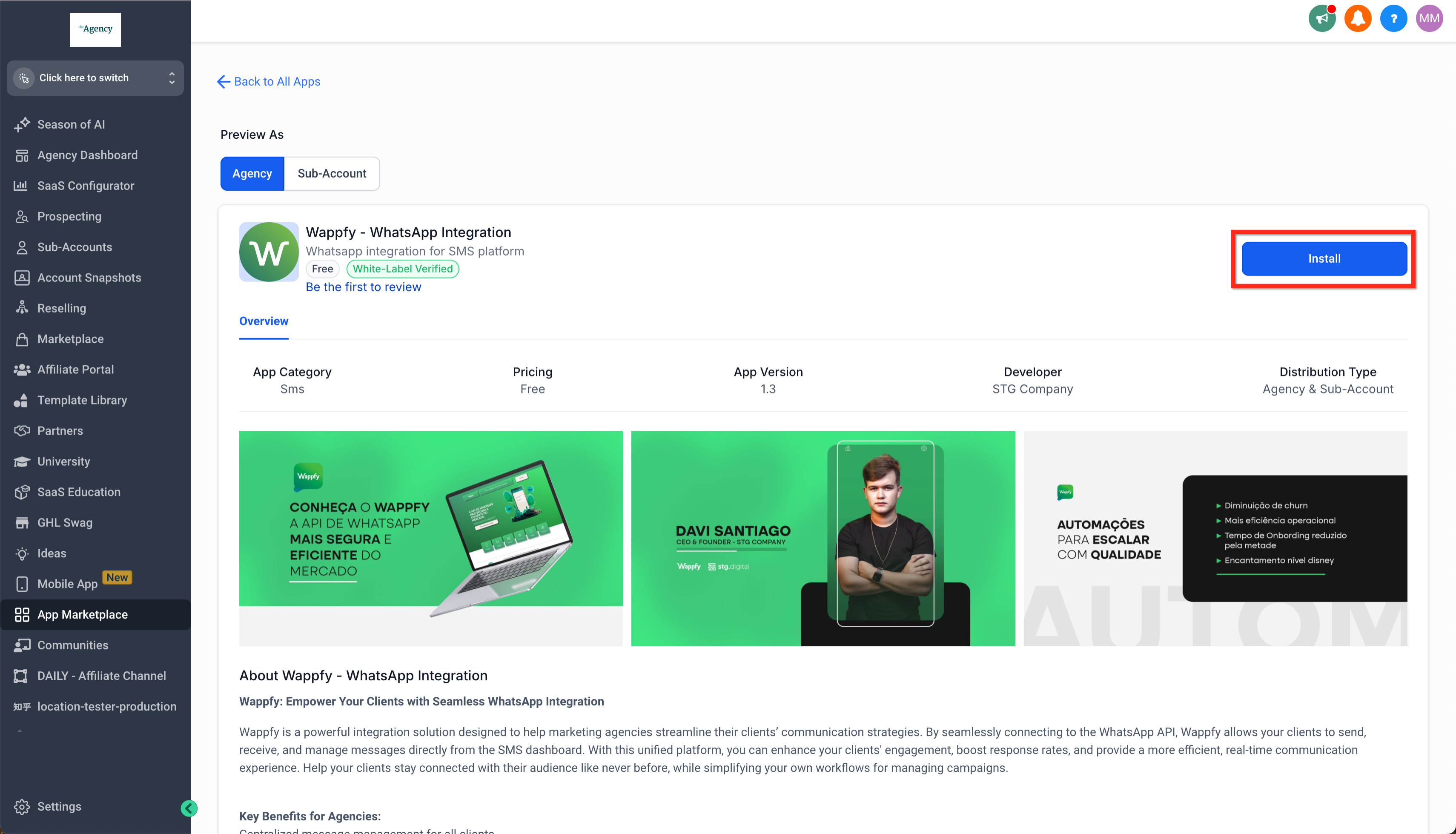 **How To Install A Custom Conversation Provider (image 4 of 10)** This screenshot appears in the "How To Install A Custom Conversation Provider" section of "Custom Conversation Providers in Mobile App". The text alongside this image reads: If you want to develop apps for the GHL Customer Care App Marketplace start here https://marketplace.https://ghlcustomercare.com/. Immediately after, the guide continues: You'll find custom conversation providers in the Conversations tab of the mobile app. You can start a new conversation on any channel, including custom providers, or you can switch to a different channel manually inside an existing…. - What this covers: If you want to develop apps for the GHL Customer Care App Marketplace start here https://marketplace.https://ghlcustomercare.com/ - Next: You'll find custom conversation providers in the Conversations tab of the mobile app. You can start a new conversation on any channel, including custom providers, or you can switch to a different channel manually inside an existing conversation. |
| Select one or more subaccounts you want to install the app into and click Continue | 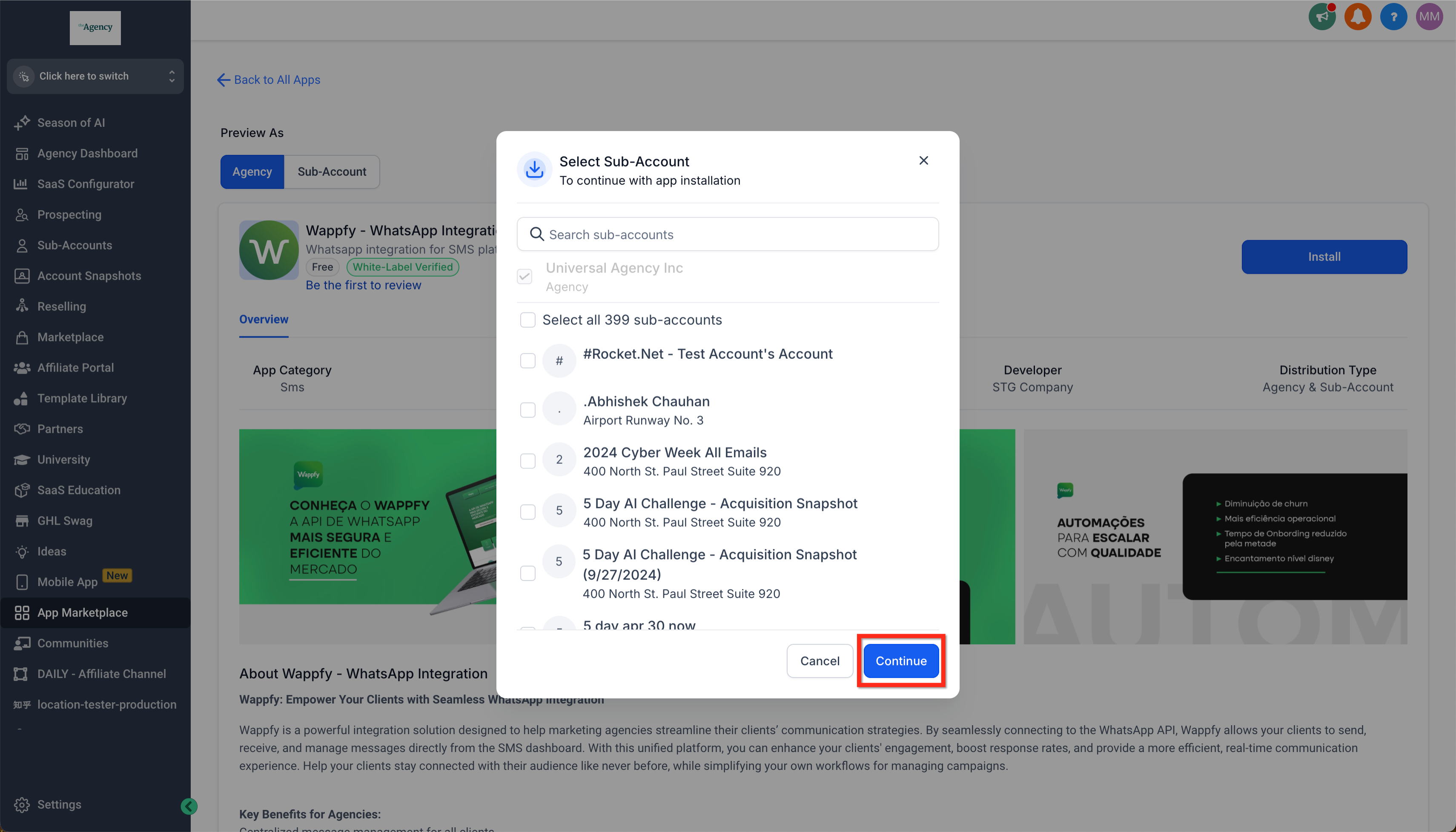 **How To Install A Custom Conversation Provider (image 5 of 10)** This screenshot appears in the "How To Install A Custom Conversation Provider" section of "Custom Conversation Providers in Mobile App". The text alongside this image reads: If you want to develop apps for the GHL Customer Care App Marketplace start here https://marketplace.https://ghlcustomercare.com/. Immediately after, the guide continues: You'll find custom conversation providers in the Conversations tab of the mobile app. You can start a new conversation on any channel, including custom providers, or you can switch to a different channel manually inside an existing…. - What this covers: If you want to develop apps for the GHL Customer Care App Marketplace start here https://marketplace.https://ghlcustomercare.com/ - Next: You'll find custom conversation providers in the Conversations tab of the mobile app. You can start a new conversation on any channel, including custom providers, or you can switch to a different channel manually inside an existing conversation. |
| Review the app details and click Allow & Install | 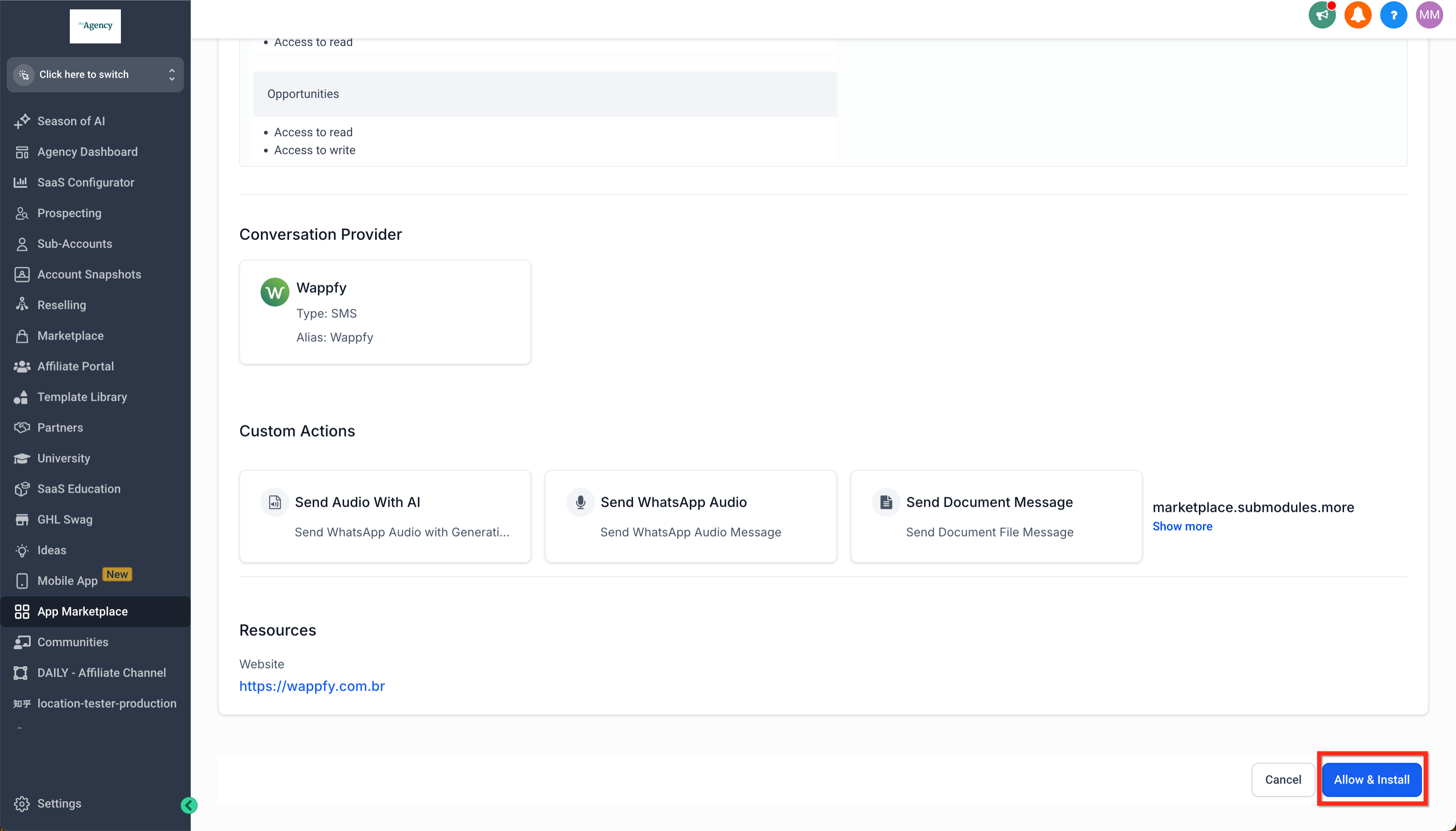 **How To Install A Custom Conversation Provider (image 6 of 10)** This screenshot appears in the "How To Install A Custom Conversation Provider" section of "Custom Conversation Providers in Mobile App". The text alongside this image reads: If you want to develop apps for the GHL Customer Care App Marketplace start here https://marketplace.https://ghlcustomercare.com/. Immediately after, the guide continues: You'll find custom conversation providers in the Conversations tab of the mobile app. You can start a new conversation on any channel, including custom providers, or you can switch to a different channel manually inside an existing…. - What this covers: If you want to develop apps for the GHL Customer Care App Marketplace start here https://marketplace.https://ghlcustomercare.com/ - Next: You'll find custom conversation providers in the Conversations tab of the mobile app. You can start a new conversation on any channel, including custom providers, or you can switch to a different channel manually inside an existing conversation. |
| As required, follow specific instructions from the custom conversation provider to integrate (ex: get your API key for their service). | 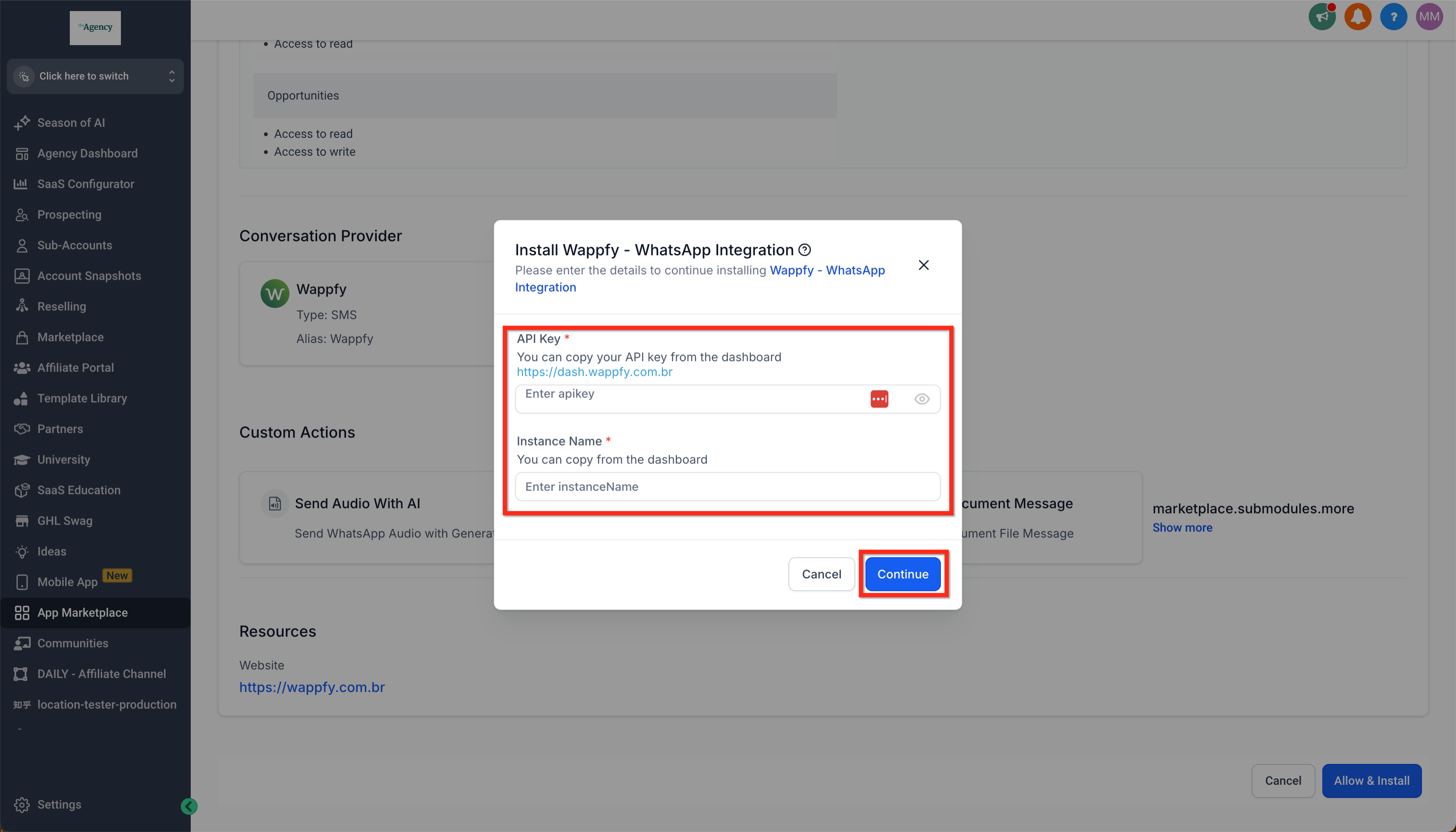 **How To Install A Custom Conversation Provider (image 7 of 10)** This screenshot appears in the "How To Install A Custom Conversation Provider" section of "Custom Conversation Providers in Mobile App". The text alongside this image reads: If you want to develop apps for the GHL Customer Care App Marketplace start here https://marketplace.https://ghlcustomercare.com/. Immediately after, the guide continues: You'll find custom conversation providers in the Conversations tab of the mobile app. You can start a new conversation on any channel, including custom providers, or you can switch to a different channel manually inside an existing…. - What this covers: If you want to develop apps for the GHL Customer Care App Marketplace start here https://marketplace.https://ghlcustomercare.com/ - Next: You'll find custom conversation providers in the Conversations tab of the mobile app. You can start a new conversation on any channel, including custom providers, or you can switch to a different channel manually inside an existing conversation. |
| Review your installed custom conversation providers by navigating to Subaccount > Settings > Conversation Providers | 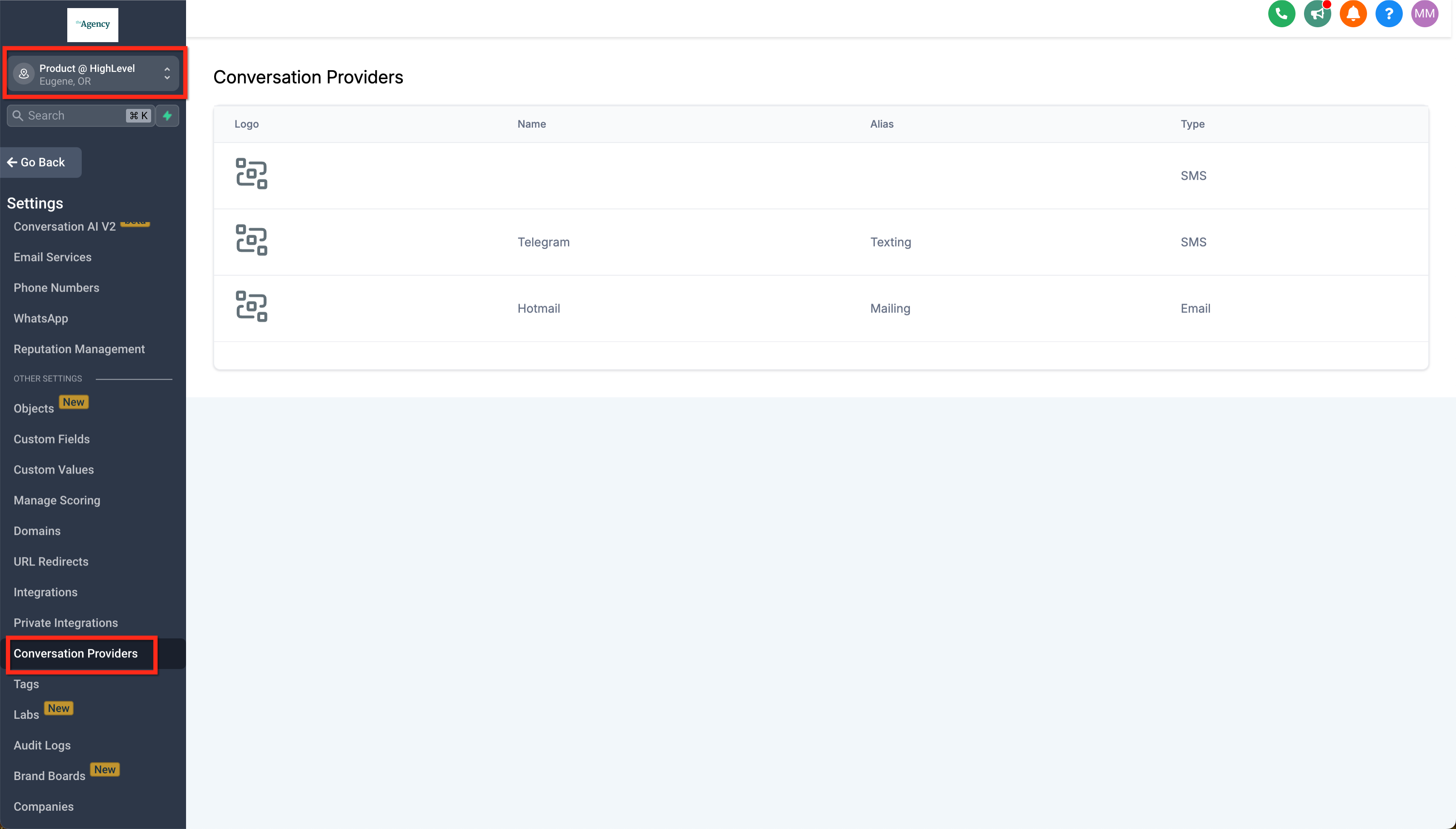 **Where To Find Custom Conversations (image 8 of 10)** This screenshot appears in the "Where To Find Custom Conversations" section of "Custom Conversation Providers in Mobile App". The text alongside this image reads: You'll find custom conversation providers in the Conversations tab of the mobile app. You can start a new conversation on any channel, including custom providers, or you can switch to a different channel manually inside an existing conversation. - What this covers: You'll find custom conversation providers in the Conversations tab of the mobile app. You can start a new conversation on any channel, including custom providers, or you can switch to a different channel manually inside an existing conversation. |
| In your mobile app navigate to Conversations > New to see your options. Custom conversation providers will appear here. Select one to start a new conversation. | 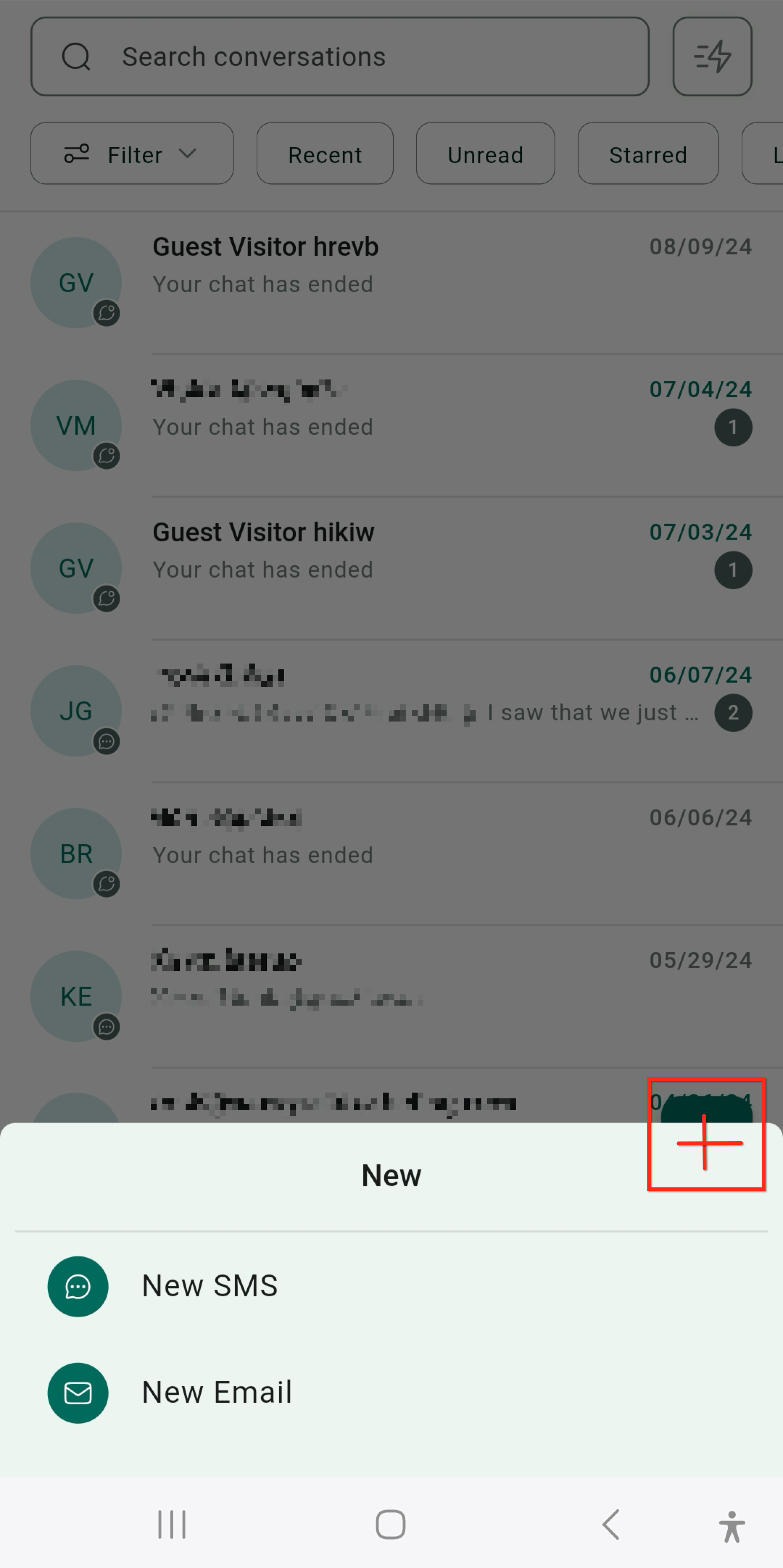 **Where To Find Custom Conversations (image 9 of 10)** This screenshot appears in the "Where To Find Custom Conversations" section of "Custom Conversation Providers in Mobile App". The text alongside this image reads: You'll find custom conversation providers in the Conversations tab of the mobile app. You can start a new conversation on any channel, including custom providers, or you can switch to a different channel manually inside an existing conversation. - What this covers: You'll find custom conversation providers in the Conversations tab of the mobile app. You can start a new conversation on any channel, including custom providers, or you can switch to a different channel manually inside an existing conversation. |
| In the mobile app you can also find all your conversation options, including custom conversation providers, inside of a conversation. Just select a new conversation mode to switch. | 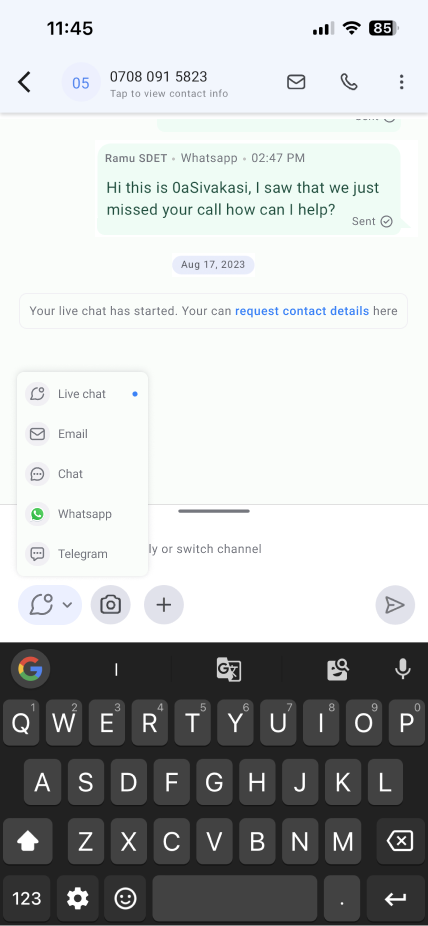 **Where To Find Custom Conversations (image 10 of 10)** This screenshot appears in the "Where To Find Custom Conversations" section of "Custom Conversation Providers in Mobile App". The text alongside this image reads: You'll find custom conversation providers in the Conversations tab of the mobile app. You can start a new conversation on any channel, including custom providers, or you can switch to a different channel manually inside an existing conversation. - What this covers: You'll find custom conversation providers in the Conversations tab of the mobile app. You can start a new conversation on any channel, including custom providers, or you can switch to a different channel manually inside an existing conversation. |